

Start with a Science Scene
Start with a DNA double helix, expanding water ripples or an orbital view of Earth. Each preset includes a focused prompt you can adapt to your lesson.
Show a molecule, follow a drop of dye or take your audience into orbit. GlobalGPT pairs science scene presets with editable prompts and video models in one workspace, so your next explanation starts with a visual people can follow.
Create a Science Clip
Prompt Guide
Model
Reference Image
Build one clear scene, then shape it into your lesson or explainer.
Start with biology, physics, chemistry or Earth science. Pick a preset, describe your scene, or add a reference image. Decide what viewers should notice first.
Ask for a slow rotation, spreading dye or a gentle camera move. Choose a model and the available video format and length. Keep each short clip focused on a single idea.
Preview the motion and check scientific details against your source material. Refine the prompt, then download the clip. Add verified labels, narration and other scenes in your video editor.
Explore five vertical science-themed clips and one leaf-stomata storyboard still. These are AI-generated visual concepts; check scientific details before using them in a lesson or explainer.
Small air bubbles emerge from a diffuser at the bottom of a clear tank, rise through the water and disappear at the surface. Show the complete path in a fixed vertical view, with stable glass and no text.
Try This PromptA white absorbent paper strip dips into blue-colored water. In an accelerated time-lapse, the wetting front rises continuously from the immersed tip while the paper above remains dry. Fixed vertical camera, no labels.
Try This PromptA macro view of clear water beads resting on a waxy green lotus leaf. Slight leaf movement makes the droplets wobble gently while remaining in contact with the surface. Soft daylight, fixed vertical camera, no text.
Try This PromptAn accelerated macro visualization of droplets on the outside of a cold glass containing iced water. Focus on droplets growing, merging and sliding down the exterior. Fixed vertical camera, no labels. A conceptual scene to review before educational use.
Try This PromptA conceptual accelerated time-lapse of a small ice cube on a dark dish, gradually rounding and shrinking as liquid water collects around it. Fixed vertical macro camera, no text. Review the generated material changes before educational use.
Try This Prompt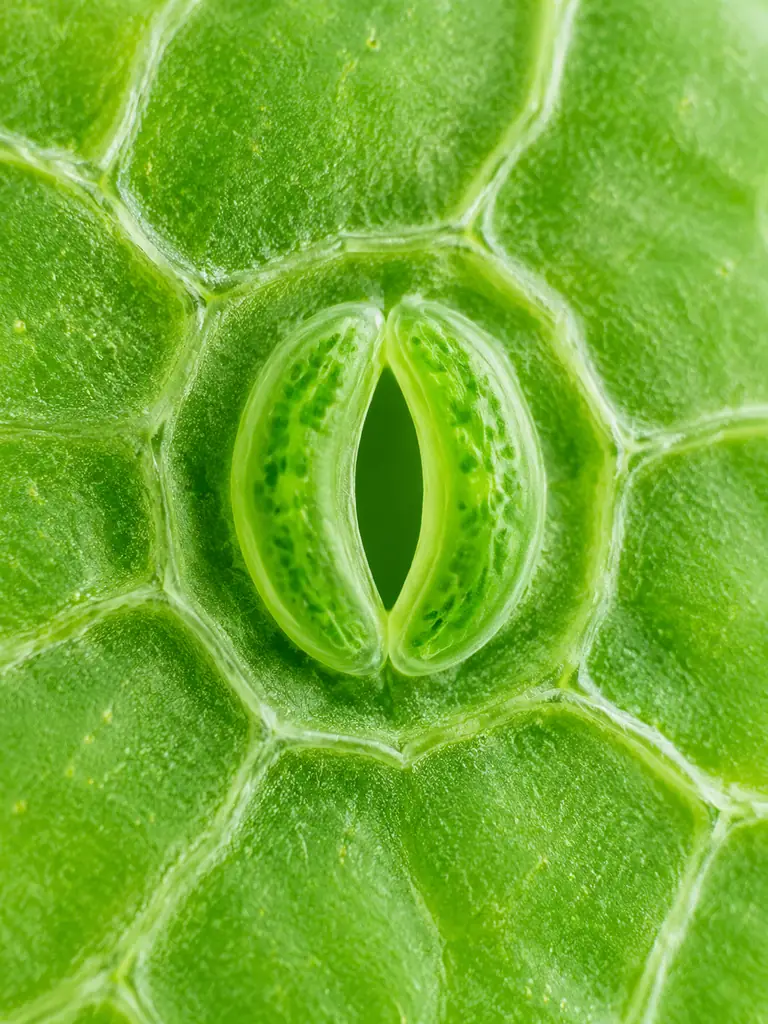 Biology
A bright scientific macro visualization of the underside of a green leaf, one clearly defined open stoma formed by two curved guard cells, realistic botanical textures with gently simplified geometry. Pale green background, vertical 3:4 frame, no arrows or labels. Use this static image as a storyboard reference.
Try This PromptBuild scenes around the concept you want people to understand.
Start with a DNA double helix, expanding water ripples or an orbital view of Earth. Each preset includes a focused prompt you can adapt to your lesson.
Guide the visual direction with an image, then describe the movement. A clear, uncluttered reference makes your starting idea easier to communicate.
Specify the subject, background and camera. A fixed view can help viewers follow diffusion; a slow push-in can draw attention to a structure.
Choose a wide scene for a presentation or a vertical composition for science Shorts. Keep the important action away from the edges.
Try the same brief with different models in the workspace. Compare how each interprets your subject and motion before choosing a clip.
Generate focused visuals for your storyboard. Combine the selected clips with your own verified narration, labels and diagrams in an editor.
Illustrative workflow scenarios with fictional names; these are not verified customer reviews.
For a biology lesson, Maya uses a DNA close-up to introduce the shape of the helix, then adds checked labels in her lesson slides.
For a chemistry explainer, Daniel keeps the camera still while a dye plume spreads, then pairs the clip with his own explanation of diffusion.
For a science Short, Sofia plans one orbital scene per idea and adds narration after checking the visuals against her astronomy sources.
An AI science video generator creates short science-themed clips from text prompts or reference images. Use GlobalGPT to make conceptual visuals for biology, physics, chemistry and Earth science, then combine them with your explanation in a lesson, presentation or video.
Yes, as illustrative material after review. AI visuals can contain errors in anatomy, molecular structure, physical motion or scale. Check each clip against trusted references, label simplified concepts clearly, and use validated diagrams or simulations when exact scientific behavior matters.
You can add a reference image to guide a short video and describe how it should move. Complex diagrams and small labels may change during generation. Build a longer lesson from separate clips, and add verified labels, narration and subtitles in an editor; those editing steps are not part of this workspace.
Name the subject, one action, the visual style and the camera view. For example: One drop of blue dye slowly disperses in clear water, fixed camera, bright laboratory lighting, no labels. Keep the action simple and add precise scientific terminology only when you can check the result.
Eligible users can start with the trial shown in the workspace. Available credits, models and generation limits depend on your account; further use may require a paid plan. Check the current options before generating, and review the applicable terms for commercial use.